Face, Body Editor - Retouch Me
- 3.9
- Rating
- 1.00M
- Installs
- Free
- Price
 Analysis by App-foxy
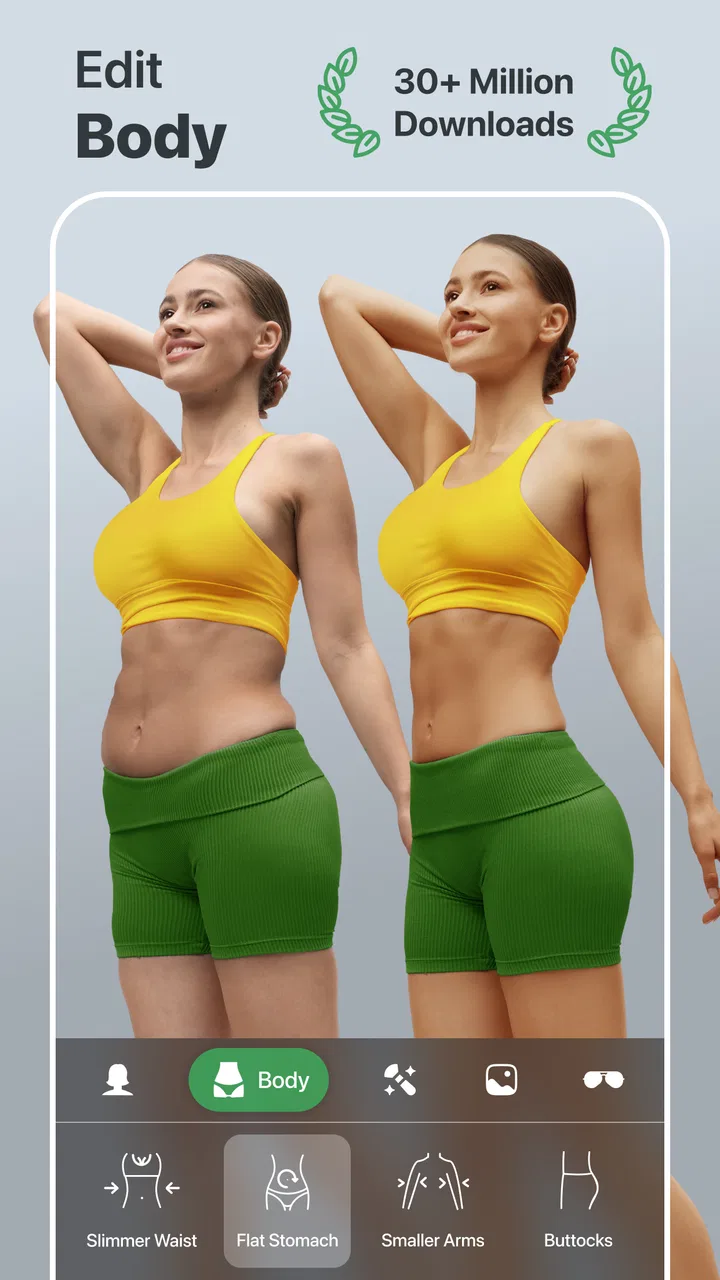
I approached Face, Body Editor - Retouch Me as a practical photography tool rather than a replacement for a full desktop editor. Its purpose is clear: make targeted changes to portraits and body-focused photos without asking me to learn a complicated editing workflow. In everyday use, that makes it appealing when I want a quick improvement for a profile picture, a holiday snapshot, or a social post and do not want to spend time building masks and layers from scratch.
The app is free to install, and its content rating is Everyone, so it is easy to try on a wide range of devices. It comes from GOOD RETOUCH LP and sits in the photography category. The current version is 8.30, and it requires Android 9 or later. Those details matter because this is the kind of editor people often open spontaneously, directly after taking a photo; compatibility and a low entry barrier are more useful here than a long list of professional tools.
My overall impression is that this is best understood as a focused portrait retouching app. It is not trying to be a general photo laboratory. The decision is therefore less about whether it has every editing feature and more about whether your regular photos need quick face, body, and blemish adjustments. If that is your main goal, the streamlined approach can save time. If you prefer natural, manual editing or work with many different image types, a broader editor may suit you better.
You May Also Like

 Blood Strike: 2.5 Anniversary
Blood Strike’s Loadouts Turn Every Drop Into a Tactical Gamble
A close look at Blood Strike’s custom loadouts: how fast access to signature weapons reshapes its battle royale rhythm, rewards preparation, and narrows the gap between fights.

 Pandora - Music & Podcasts
Pandora’s Music Is Easy to Start, but Harder to Recover
Pandora’s strength is its low-effort path from a seed to a station. Its weak spot is how much confidence it asks you to place in connection, setup, and quiet recovery.

 8 Ball Pool
 Is Built on Rivalries, Rematches, and Routine
A close look at the rivalries, rematches, shared routines, and unanswered safety questions that turn a quick pool match into a persistent mobile community.

 Samsung Music
’s Quiet Strength Is Playing What You Already Own
Its reach comes less from spectacle than from dependable access to a personal library. That simplicity is both the app’s strongest retention engine and its ceiling.

 AccuWeather: Weather Radar
AccuWeather Review: A Quick, Clear Forecast for Everyday Decisions
For everyday plans, the best forecast is the one you can understand quickly. AccuWeather makes rain timing, radar, and local conditions easy to act on, with a few trade-offs.

 Hill Climb Racing
Why Hill Climb Racing Still Turns Crashes Into One More Run
A tiny car, a bumpy hill and one more upgrade: Hill Climb Racing keeps resurfacing because its simple chaos makes every near-miss feel personal.
More From Our News Desk



How I Decided Whether It Was Worth Keeping
The first question I would ask before installing it is what kind of correction I make most often. Someone who mainly wants to remove a small spot, soften an uneven area, or make a portrait look a little more polished has a different need from someone who wants exposure controls, color grading, perspective correction, and detailed retouching on landscapes. Face, Body Editor - Retouch Me is aimed at the first group.
I also considered how much control feels comfortable on a phone. A mobile editor can become frustrating when every adjustment requires precise finger work, especially around hair, clothing edges, and facial features. A specialized app has an advantage when its controls are organized around recognizable results rather than technical terminology. I found that helpful for quick edits, although it also means that users looking for exact, repeatable professional adjustments may eventually feel constrained.
Another decision factor is the level of change you actually want. Body shaping tools can produce a useful correction when applied carefully, but they can also make a picture look artificial if pushed too far. My preferred workflow is to make the smallest change that solves the problem, then check the entire image rather than judging only the edited area. This is particularly important with portraits, where a distorted background or an unnatural proportion can be more noticeable than the original imperfection.
The app has attracted over a million installs, with an average rating of 3.9 from around three thousand ratings and nearly two hundred written reviews. I read those figures as a sign of broad interest rather than a guarantee that every user will have the same experience. A specialized editor can be genuinely useful for one person and feel limited to another, depending on whether speed or detailed control is the priority.
What the editing workflow feels like
I like to begin with a duplicate or an unedited copy of the image. That simple habit is especially valuable here because body and face adjustments can be difficult to judge after several consecutive changes. I make one correction, inspect the surrounding lines and proportions, and only then move to the next. This avoids the common mistake of stacking several subtle edits until the final image no longer resembles the original person.
A useful technique is to zoom out before finishing. At close range, a blemish remover may seem perfect, while the overall skin texture looks too smooth when the image is viewed at normal size. The same applies to slimming or shaping: the result may look acceptable around the subject but reveal bending in a nearby wall, door frame, table edge, or tiled floor. Checking the full composition is one of the most important quality controls for this type of app.
I would also keep the original lighting in mind. Retouching can improve a distracting mark, but it cannot fully repair a badly underexposed face or harsh light falling across the body. If the source photo is weak, a conventional editor with stronger brightness, contrast, shadow, and color controls may be the better first step. This app works best when the photograph is already broadly usable and needs a focused finishing touch.
Where it is strongest for everyday portraits
The clearest strength is convenience. I do not need to assemble a complicated sequence of selections, brushes, and layers just to prepare a portrait for a casual post. The focus on face and body editing makes the app easier to understand than a general-purpose editor when the desired result is specific. That is valuable for users who know what they want to change but do not know the technical name for the tool that would do it.
A realistic example would be a group photo taken before dinner. One person notices a temporary blemish, another wants a small adjustment to the way clothing sits, and everyone wants the image ready before the evening is over. In that situation, a focused editor is more practical than opening a professional application and rebuilding the image manually. I would still keep the edits restrained, because fast tools make it easy to accept an exaggerated result simply because it appears immediately.
The blemish-removal side is also useful for small distractions that are not really part of a person’s appearance, such as a speck on the lens effect, a stray mark, or a temporary skin issue. The important distinction is between removing a minor distraction and erasing natural texture. I prefer using this kind of correction selectively, leaving enough detail for the face to remain believable.
Another advantage is its clear audience. The store describes it as a face and body editor, and that specialization is reflected in the way I would use it: choose a portrait, make a limited correction, compare the result, and save only when the image still feels like a photograph rather than a heavily processed illustration. It is a good fit for occasional personal editing, social images, and users who value a short path from photo to finished result.
There is also a practical benefit for people who do not want to spend time learning desktop retouching. The app lowers the technical barrier, which can make editing less intimidating. I would recommend starting with one tool at a time, because the temptation to explore every face and body adjustment in one session is exactly what can make a natural portrait look overworked.
Limits that affect the final quality
The same specialization that makes the app approachable can become a limitation. If I want to correct a crooked horizon, balance a difficult exposure, remove color casts, or create a consistent look across a set of photographs, I would rather use a broader photography editor. Face, Body Editor - Retouch Me makes more sense as a targeted retouching stage than as the only editor in my phone.
Precision is another consideration. Finger-based editing is convenient, but it is not identical to working with a large display, a mouse, or a stylus. Fine edges around hair, hands, jewelry, and patterned clothing require patience. I would not rely on a quick automatic-looking result for an important professional image without inspecting it carefully at different zoom levels.
Body reshaping deserves a particularly honest warning. Even a small adjustment can alter nearby straight lines and recognizable objects. I would avoid editing photos with strong architectural backgrounds unless I am prepared to examine those areas closely. A portrait against a simple, uncluttered background is much more forgiving than a full-body image beside shelves, railings, windows, or brickwork.
The app is free, but in-app purchases range from $0.99 to $99.99 per item. That makes it important to pay attention to the purchase path before committing to a larger editing routine. A free starting point is useful, yet the overall value depends on how often I use the paid options and whether the results justify that expense for my particular photos. Someone editing only once in a while may prefer to stay within the free experience, while a frequent user should consider the long-term cost before making the app part of a regular workflow.
I would also avoid assuming that a specialized retouching app automatically produces professional results. The quality of the source image, the amount of correction, and the background all matter. The app can shorten the process, but it cannot replace judgment. In my experience, the best result comes from using it as a subtle finishing tool, not as a way to redesign every feature in a picture.
When another category is the better choice
For full creative control, I would choose a general photo editor. Those apps are usually better suited to a workflow that begins with cropping and exposure, continues through color and detail adjustments, and ends with selective retouching. They take longer to learn, but they are more flexible when a photo has several different problems rather than one obvious portrait issue.
For serious beauty work, a desktop-oriented retouching program may still be preferable. Larger screens make detailed selections easier, and layered editing makes it simpler to revise one decision without damaging the rest of the image. That route is excessive for a quick social photo, but it becomes worthwhile when the picture is for a portfolio, a printed project, or a client.
For users who want a consistent appearance across many photos, I would also look for an editor centered on presets, batch processing, or broader color management. This app is more naturally suited to individual images where the subject is the main concern. Applying the same body or face correction to a whole group would not make sense because posture, lens angle, clothing, and lighting change from photo to photo.
There is a social consideration too. If you are uncomfortable with appearance-focused editing or do not want an app that encourages changing body proportions, this may simply be the wrong category for you. A crop, gentle color adjustment, or blemish-only workflow can preserve the character of a photo more comfortably. I would skip this app if my goal were to document people authentically with minimal alteration.
What switching to it really involves
Moving from a general editor to this app is not difficult when your needs are narrow. The main adjustment is mental: instead of searching through a large toolbox, I would go directly to the portrait or body correction I have in mind. That can make occasional editing faster, especially when I am working on a single image and do not need a complete color workflow.
The trade-off is that I may need to move between apps. I might correct lighting and crop in a general editor, use this app for a carefully limited face or body adjustment, and then return to the first editor for final color balance. That is not necessarily a problem, but it adds an extra save-and-review step. I would keep the intermediate image at the highest available quality and avoid repeatedly exporting the same file, since repeated compression can soften details.
There is also a learning cost, even though the app is designed to be approachable. The controls may be easy to find, but judging how much correction is enough still takes practice. My advice is to create a personal stopping rule: if I can clearly identify the edit before someone else sees the photo, I have probably gone too far. Comparing the edited image with the original after a short break is often more revealing than staring at the result continuously.
Cost can influence the switch as well. Because the app is free to install but includes individual in-app purchases from $0.99 up to $99.99, I would try it on several ordinary photos before paying for anything. That test should include a close portrait, a full-body image, and a picture with a detailed background. If the results remain natural across those cases, the purchase may be easier to justify; if the app only works on simple images, a broader editor could offer better value.
My recommendation for different kinds of users
I recommend trying Face, Body Editor - Retouch Me if your main need is quick, phone-based portrait cleanup and you want face or body adjustments without learning a complex editing system. It is particularly suitable for personal photos, profile images, and occasional social posts where speed matters more than a fully manual workflow. The free entry point makes that trial relatively straightforward, provided you stay aware of the optional purchase range.
I would recommend a restrained approach rather than using every available correction. Start with one visible distraction, preserve natural skin texture, and inspect the background after any shaping edit. Those three habits do more for the final result than simply increasing the strength of a tool. They also help the app serve its best purpose: making a good photo feel a little cleaner without making the edit the first thing people notice.
I would skip it if I need advanced color work, detailed layer-based retouching, batch consistency, or dependable control over complex selections. In those situations, the usual full-featured photography alternatives are a better fit, even if they take longer to learn. I would also choose another approach if I am trying to preserve an entirely documentary look or if the image contains architectural lines that could expose reshaping artifacts.
After considering its audience, workflow, alternatives, and purchase structure, I see this as a useful specialist rather than an all-purpose solution. Its 3.9 average and more than a million installs suggest that it has found a sizable audience, but popularity does not remove the need for careful editing. For me, the deciding point is simple: if I regularly need fast face, body, or blemish corrections on individual photos, this app is worth testing. If my editing needs extend beyond that, I would keep it as an occasional companion—or choose a broader editor instead.
FAQs for Face, Body Editor - Retouch Me
01What is Face, Body Editor - Retouch Me used for?
Face, Body Editor - Retouch Me is a photo-editing app designed for enhancing portraits and full-body images. During testing, its main tools focused on reshaping the body, refining facial features, smoothing skin, removing imperfections, adjusting proportions, and applying other cosmetic retouches. It is intended for users who want quick, noticeable edits without needing advanced desktop editing software or professional design experience.
02Is Face, Body Editor - Retouch Me free to download and use?
The app can generally be downloaded at no initial cost, but some editing tools, effects, or export options may be restricted to premium users. Depending on the version and platform, the app may include advertisements, in-app purchases, or a subscription plan. Before confirming any payment, users should carefully review the pricing, renewal terms, and trial conditions shown in the App Store or Google Play.
03Can beginners use the body and face retouching tools easily?
Yes, the editing interface is aimed at casual users rather than professional photographers. Most adjustments can be made by selecting a tool and moving an on-screen slider or applying an effect directly to the image. However, achieving a natural result may require patience, especially when reshaping body areas or facial features. Excessive adjustments can make the photo look distorted or artificial.
04Does the app require an internet connection to edit photos?
Some basic editing functions may work with photos already stored on the device, but the exact offline capabilities can vary by app version, operating system, and feature. Certain effects, premium tools, advertisements, cloud processing, or sharing functions may require an internet connection. If offline editing is important to you, test the main tools after installation and check the app’s current permissions and store description.
05Are edited photos private and safe to use in this app?
Users should review the app’s privacy policy before importing personal or sensitive images. Photo editors may request access to the device gallery, camera, or storage, while some features can involve online processing or third-party services. Only grant permissions that are necessary, avoid uploading confidential images, and check whether the app stores, synchronizes, or shares edited photos before using it for private content.
Pros
- Simple tools make quick face and body adjustments easy for beginners.
- Includes reshaping options for waist
- legs
- face
- and other areas.
- Useful filters and retouching effects help create polished photos.
- Suitable for preparing images for social media profiles and posts.
- Previewing edits makes it easier to compare changes before saving.
Cons
- Some advanced editing tools may require a subscription or extra payment.
- Strong adjustments can make photos look unnatural if used excessively.
- Results may vary depending on image quality
- lighting
- and camera angle.
- The app may display ads during editing or while accessing certain features.
- Edited photos can take time to process on older phones.

Face, Body Editor - Retouch Me
Gallery